


Here’s How You Can Turn-Off Facebook Videos From Playing Automatically In Your News Feed

Supported by


Untitled-1


Image Courtesy: Iprospect


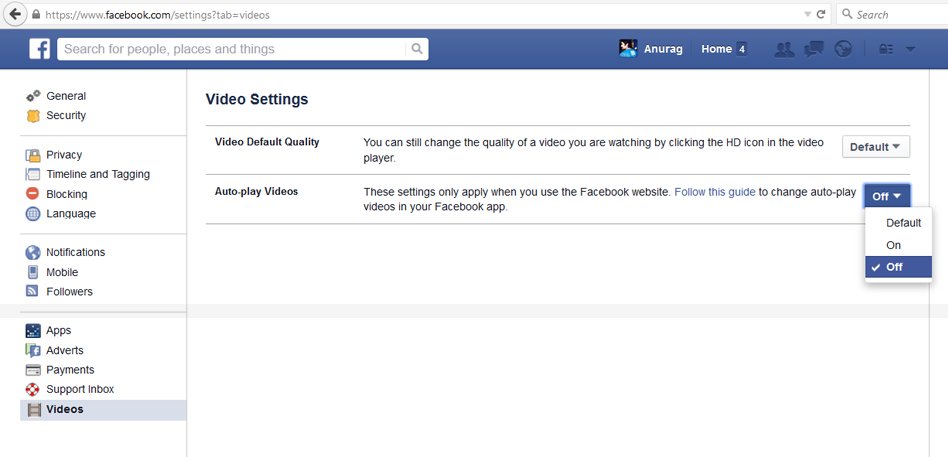
 To stop videos from playing automatically on your computer:

  1. From the top right of Facebook, click and select Settings
  2. Click Videos in the left menu
  3. Click the dropdown menu next to Auto-play Videos and select Off


To adjust the auto-play settings on your Android phone or tablet:

  1. Open the Facebook app
  2. Tap ≡
  3. Scroll down and tap App Settings
  4. Tap Video Auto-play
  5. Choose an option
Note: If you don’t see the Video Auto-play settings on your Android phone, log out of the Facebook app. When you log back into Facebook, Video Auto-play should be visible in App Settings.

To adjust the auto-play settings on your iPhone or iPad:

  1. Open the Facebook app
  2. Tap ≡
  3. Scroll down and tap Settings
  4. Tap Videos > Autoplay
  5. Choose an option
Note: If you don’t see Videos in your iPhone or iPad’s Facebook app settings, try updating the Facebook app.
#PoweredByYou We bring you news and stories that are worth your attention! Stories that are relevant, reliable, contextual and unbiased. If you read us, watch us, and like what we do, then show us some love! Good journalism is expensive to produce and we have come this far only with your support. Keep encouraging independent media organisations and independent journalists. We always want to remain answerable to you and not to anyone else.

Featured

Amplified by

Ministry of Road Transport and Highways

From Risky to Safe: Sadak Suraksha Abhiyan Makes India’s Roads Secure Nationwide

Amplified by

P&G Shiksha

P&G Shiksha Turns 20 And These Stories Say It All

Recent Stories

‘Show Accountability By June 27’: Sonam Wangchuk Announces Hunger Strike Amid CJP Protest

Change in Menu: Eggs Off School Plates, ISKCON to Serve Vegetarian Mid-Day Meals Across Bengal

Forced to Quit School in 2012, Satyendra Pal Now Educates Hundreds of Slum Children for Free

Contributors

Writer : 
Editor : 
Creatives :